Overview
Novari eRequest can generate referrals automatically from an HIS Order sent to the Novari eRequest Inbox. This eliminates the manual need of processes such as, linking a referring provider, locating the patient record, and completing fields.
Auto Create is configured during the implementation stage and relies on the integration of your HIS Orders with the Novari eRequest Inbox. During this phase, the following elements would have been identified to support automation:
Preferred state
Preferred bucket(s)
Preferred dashboard(s)
Preferred actions (i.e., send to scheduling)
Auto link to HIS (Meditech, Cerner, etc)
If using the Novari eRequest Auto Create functionality, Novari eRequest can automatically link the referral to the appointment in the HIS using the ExternalReferenceNumber.
Assumptions: The HIS will include a unique alphanumeric Order Number.
Novari eRequest will return an ORM O01 with an ORC-1 of 'XO', Order ID in ORC-2 and Novari ID in ORC-3. The HIS should save this Novari ID to include in scheduling messages.
Auto Create Failure Messages
From time to time, Novari eRequest might not successfully generate a referral from an order that originated in the HIS. When this occurs, the order remains in the Inbox, you are notified of the problem, and for the majority of orders, you can fix the issue by handling the order manually.
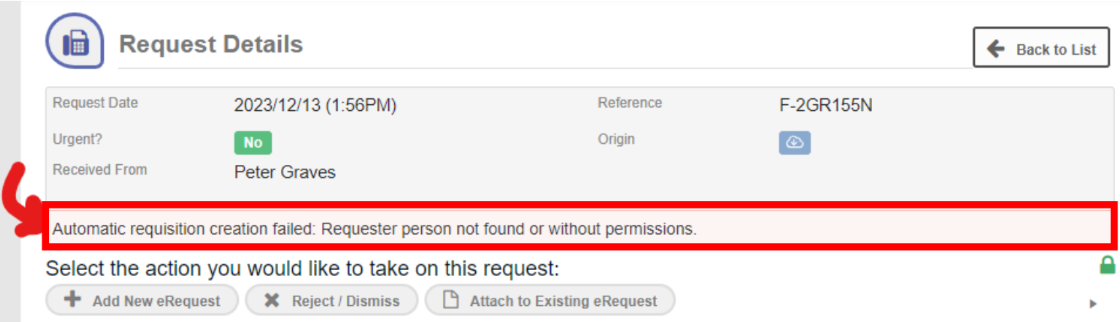
For the following Auto Create failures, process the referral manually following your usual procedures. An incoming Order from an HIS will fail automatic creation when any of the following occurs:
Requester can’t be found or doesn't have the necessary Location permissions.
Use the Administrator tab to navigate to the list of People to ensure the requester is there and has the correct Location permissions.
If you don’t have access to the Administrator tab, ask your Novari eRequest Administrator to confirm the requester exists and has the necessary permissions.
The required health card number or MRN is missing.
The patient's first name doesn’t match the one on file.
The patient's last name does not match the one on file.
The patient's birthdate does not match the one on file.
The patient’s health card number is incorrect.
A piece of information about the patient is missing. The error message informs you which piece of information is missing.
Novari eRequest could not add or insert the patient. This error occurs when Novari eRequest encounters an issue when adding or updating the patient in the Central Patient Index after the patient has been searched and retrieved.
It’s possibly a duplicate requisition.
Technical Failures
There may be a technical reason causing the auto creation process to fail. These are rare and can only be investigated by Novari Health Support. In the meantime, you can manually process the referral from the Inbox.
Novari eRequest can’t find the requisition type.
Novari eRequest was unable to retrieve the new requisition details.
Some required field values are missing.
No action was found at this step in the Novari eRequest pathway.
Novari eRequest encountered an error while creating the requisition.
Was this article helpful?
That’s Great!
Thank you for your feedback
Sorry! We couldn't be helpful
Thank you for your feedback
Feedback sent
We appreciate your effort and will try to fix the article