How do I indicate when a referral has missing information from the referral sender?
Usually on the Request form there is an accordion that allows you to indicate missing information and a action to move the referral into that state. The standard Missing Information accordion is displayed below; however, yours may have a different name or the Information Missing component may be in another accordion.
To indication when a referral has missing information:
Open the missing information accordion
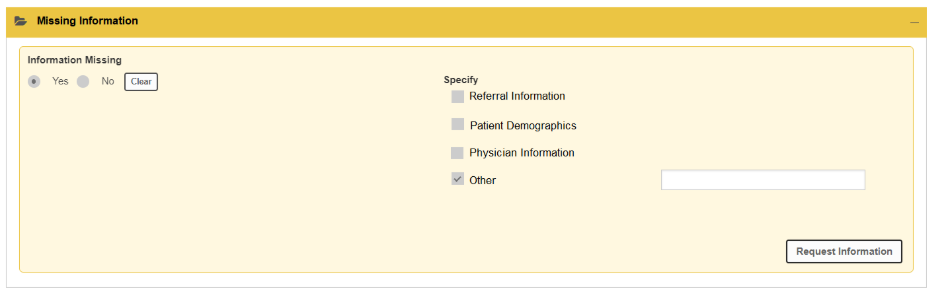
Select the type or types of information that is missing. Your list may be different from the standard list shown above.
Select Request Information.
The referral refreshes, the state changes to Information Required and appears in a separate bucket on your dashboard, often named Requires Information.
Note: When completing this for an electronic request, the referral appears in the requester’s Information Required bucket on their dashboard.
Once the information is faxed back, you can forward and attach from the Inbox to the referral and then resubmit to move the referral out of the Information Required state back to the prior state it was in originally.
Was this article helpful?
That’s Great!
Thank you for your feedback
Sorry! We couldn't be helpful
Thank you for your feedback
Feedback sent
We appreciate your effort and will try to fix the article